

If you’ve cared about code quality and consistency before AI-assisted coding became standard, you surely understand the pain of setting development standards in the team. It’s an endless cycle: writing documentation that nobody reads, explaining conventions everyone forgets, and leaving the same code review comments for the hundredth time… Finally, when you and your team get on the same page, people start leaving the project. Or you get reassigned…
You might think that in the age of vibe coding and YOLO-mode development, maintaining high, universally accepted standards in a team would be even tougher. But is it really? Is it even possible to prompt AI coding agents to generate code based on the rules and standards we’ve tried to implement in our teams for so long?
I must confess something. For years, I’d dreamed of a world where development standards could just… enforce themselves. Naturally and effortlessly. Before AI disrupted software engineering, I tried automating this using various tools: from simple linters and formatters, to metaprogramming tools like Sourcery. I implemented sophisticated Danger scripts that calculated effective code coverage for files modified in pull requests, as well as for entire modules and apps. I wrote thousands of lines of CONTRIBUTING.md / README.md files and FAQ wiki pages. I maintained detailed Architecture Decision Records (ADR) describing why we did things a certain way. Although helpful, the efficiency of these tools depended heavily on how the team felt about the standards we’d developed together. It also required active effort from the team. They essentially needed to go against their internal programming, which is always tough to do, especially when deadlines loom near.
I longed for a tool that would leverage the most reliable trait of human character: our tendency to follow the path of least resistance.
And such a tool has finally arrived – in the form of agentic AI coding tools. For the first time in my career, the result of countless hours of prep work, team discussions, and hard-won agreements can actually be used to generate clean, production-ready code. Better yet, that code will continue to be generated even after the original team moves on. Interested in how to make it happen? Let’s dive in!
Note: If you’re already familiar with the challenges of maintaining development standards and want to jump straight to how AI agents solve this problem, feel free to skip ahead to The Revelation: AI Rules Files.
The Documentation Graveyard
If you’ve been around IT projects for a while, you surely understand how important documentation is. I’m sure you’ve been asked about it in several job interviews too. Then hired, I’m also sure you’ve noticed the documentation to be usually incomplete, outdated, and badly maintained…
In addition, every team has their own version of the documentation. In most cases it lives in Confluence, sprawled across multiple spaces and countless pages, most of which are no longer up to date, or directly contradict each other. Sometimes it’s a Google Doc that someone created in 2019 and shared using anyone with the link, weeks before leaving the company…
Let’s take best coding practices as an example. Did you know they should be defined in a CONTRIBUTING.md file? You didn’t? No worries – few developers do. In most projects, ensuring documentation standards is a secondary concern. And even if the project code is clean and well-maintained, usually there’s no time to document the standards guiding it. The code itself (especially the tests) serves as the de facto documentation. And there’s a good reason for that – the project code is always changing, always reflecting team values, always alive. Documentation? Not so much.
But let’s take a look at a typical CONTRIBUTING.md you might encounter in an iOS app:
## Naming Conventions

### ViewModels
All ViewModel classes should be suffixed with `ViewModel` (not `VM`, `Presenter`, or `Model`).

✅ Good: `LoginViewModel`, `ProfileViewModel`, `SettingsViewModel`
❌ Bad: `LoginVM`, `LoginPresenter`, `LoginModel`

### Services
Service classes handle external concerns (networking, persistence, etc.) and should be suffixed with `Service`.

✅ Good: `AuthenticationService`, `UserService`, `AnalyticsService`
❌ Bad: `AuthManager`, `UserHelper`, `AnalyticsHandler`
Makes sense, right? Clear examples. Good and bad patterns. Even little emoji checkmarks to make it friendly and approachable. It’s a pity most developers forget about the contents immediately after finishing onboarding. Even fewer try to maintain these files. The problem isn’t that developers are lazy or don’t care – most people I’ve worked with genuinely want to write good code that follows team conventions. The problem is that documentation is passive. It sits there, waiting to be consulted, almost hoping someone will remember it exists…

When you’re racing to finish your tasks and close the release, are you really going to stop and check whether the code you’ve implemented follows all the guidelines buried deep in some Confluence page? I think not. The path of least resistance always wins. You’ll either replicate a convention that already exists in the codebase, or simply ask AI to generate a solution for you while “acting as a senior iOS developer”. Will your code follow team standards? You’ll likely find out during code review. If that’s even an option.
Ultimately, only a few teams have historically been able to afford maintaining two independent sources of truth – the code and the documentation. It was redundant and went against basic human nature. Until now…
Linters and Formatters: The Heroes We Needed?
But what if applying coding standards could be automated? What if explicitly unwrapped optionals could prevent the app from compiling? Or at least trigger a warning?
When I first discovered SwiftLint, I genuinely thought it could solve most problems with coding standard enforcement. Instead of hoping developers would remember the principles we’d agreed on, there was a tool that could actually ensure it happened. The CI would simply not allow such PRs to be merged.
Naturally, like most of my friends, I went a little overboard at first, enabling almost every rule there was. In time, we worked out a set of rules every team member could commit to upholding.
disabled_rules:
  - opening_brace
	...

opt_in_rules:
  - empty_count
  - force_unwrapping
  - weak_delegate
  ...

cyclomatic_complexity:
  ignores_case_statements: true
  warning: 20

...

force_cast: error
force_unwrapping: error

type_body_length:
  - 300 # warning
  - 300 # error
As brilliant as SwiftLint is, it doesn’t magically solve all code problems. But what if we could complement it with a tool that enforces code style on top of its quality?
Enter SwiftFormat – a tool that fixes headers, indentation, line breaks, and more without changing what the code does. It simply makes code more readable and tidy.
When I first saw SwiftFormat in action, I was in awe. Imagine 90% of all code review comments: indentation sizes, formatting, etc., magically erased with a single bash script or pre-commit git hook. Brilliant!
Again, it took some time before we could agree on the rules. But it was worth it:
# Format Options
--header "\\n {file}\\n MyApp\\n"
--swiftversion 5.2
--allman false
--binarygrouping none
--commas inline
--self remove
--semicolons inline
--trailingclosures map,flatMap
...

# Enabled rules
--enable andOperator                  # Prefer comma over && in if, guard or while conditions.
--enable anyObjectProtocol            # Prefer AnyObject over class in protocol definitions.
--enable sortImports                  # Sort import statements alphabetically.
...

# Disabled rules
--disable isEmpty                      # In rare cases, the isEmpty rule may insert an isEmpty call for a type that doesn't implement that property, breaking the program. For this reason, the rule is disabled by default, and must be manually enabled via the --enable isEmpty option.
...
Of course, you can do much more with these tools than just selecting rules to enforce. SwiftLint supports regex-based custom rules. How about ensuring proper ViewModel naming?
custom_rules:
  viewmodel_naming:
    name: "ViewModel Naming"
    regex: "class\\\\s+\\\\w+VM\\\\s*:"
    message: "ViewModels should end with 'ViewModel', not 'VM'"
    severity: error
TL;DR: SwiftLint and SwiftFormat brought one of my biggest professional dreams – enforceable, high coding standards – close to reality. All the effort poured into developing common team coding standards finally started to pay off.
Metaprogramming: Creating Code That Creates Code
As powerful as linters and formatters can be, they have one limitation: they work post-factum – modifying code that’s already been written. But wouldn’t it be cool to apply all the rules while generating the code?
Enter Metaprogramming. Similar to higher-order functions (map, reduce, etc.) that take other functions as their data, metaprogramming does it with blocks of code. The most popular metaprogramming tool for iOS is Sourcery. Being a scripting tool, it doesn’t require compilation. It generates new Swift code using existing code and Stencil templates. Want to generate a mock for your tests? Just point Sourcery to the folder where the target protocol lives, select a template, and execute. But Sourcery can do much more than generate mocks. Think about all the manual protocol conformances, public initializer generation, dependency registration, and other boilerplate – all that repetitive stuff that’s annoying to write by hand could finally be automated.
Sourcery unlocked another level in coding standards enforcement. For the first time, you could shape the code before it was actually implemented. The downside? As you might expect, the Stencil templates were often awkward to write and even more challenging to maintain. You had to be very careful about which code you wanted generated automatically. Mocks and fakes for tests? Sure! Public initializers for your models? You bet! But things like automatically registering objects with the application’s Dependency Injection raised some eyebrows. First of all, how would Sourcery know if I even wanted to register a dependency? If so, how? As a singleton? Sure, I could make all my registrable dependencies conform to dedicated protocols describing how they should be registered. But what if special registration was required?
To better visualize the complexity of Stencil templates, let’s take a look at the simple template generating test Mock:
{% for type in types.protocols where type.based.AutoMockable or type|annotated:"AutoMockable" %}
// sourcery:file:{{ type.name }}Mock.swift
import Foundation
@testable import {{ argument.moduleName }}

final class {{ type.name }}Mock: {{ type.name }} {
    {% for variable in type.allVariables|!definedInExtension %}
    var {{ variable.name }}: {{ variable.typeName }}{% if variable.isOptional %} = nil{% elif variable.isArray %} = []{% elif variable.typeName.name == "Bool" %} = false{% elif variable.typeName.name == "Int" %} = 0{% elif variable.typeName.name == "String" %} = ""{% endif %}
    {% endfor %}

    {% for method in type.allMethods|!definedInExtension %}
    // MARK: - {{ method.name }}

    var {{ method.callName }}CallCount = 0
    {% if method.parameters.count > 0 %}
    var {{ method.callName }}ReceivedArguments: ({% for param in method.parameters %}{{ param.name }}: {{ param.typeName }}{% if not forloop.last %}, {% endif %}{% endfor %})?
    {% endif %}
    {% if not method.returnTypeName.isVoid %}
    var {{ method.callName }}ReturnValue: {{ method.returnTypeName }}!
    {% endif %}

    func {{ method.name }}{% if method.throws %} throws{% endif %}{% if not method.returnTypeName.isVoid %} -> {{ method.returnTypeName }}{% endif %} {
        {{ method.callName }}CallCount += 1
        {% if method.parameters.count > 0 %}
        {{ method.callName }}ReceivedArguments = ({% for param in method.parameters %}{{ param.name }}: {{ param.name }}{% if not forloop.last %}, {% endif %}{% endfor %})
        {% endif %}
        …
    }

    {% endfor %}
}
// sourcery:end
{% endfor %}
Just look at that beautiful, incomprehensible mess of curly braces and percent signs. I was so proud of myself. I showed it to my team like a cat presenting a dead bird: “Look what I made! Now you never have to write mocks by hand again!”
And it worked… At least for a while. With the introduction of Structured Concurrency, the entire template needed to be rewritten. I did rewrite it, since leaving it as it was meant we couldn’t use modern Swift concurrency in the project.
And these are only issues from keeping up with the SDK updates. What about team-driven decisions? Let’s say the team decided to stop tracking call counts directly in favor of a more sophisticated spy pattern. Who do you think has the know-how to implement that change? You guessed it…
Yes, Sourcery helped immensely with generating app boilerplate and proactively enforcing code quality and formatting standards, but that victory came at a cost. Looking back, the price was almost too steep to pay…
The Revelation: AI Rules Files
Fast forward to late 2024. I’d been using AI coding assistants for a while. I tried GitHub Copilot first – as part of AppCode (R.I.P.) and Android Studio, then in Xcode via the dedicated plugin. Copilot was great for boilerplate generation, exploring unfamiliar APIs, and rubber-ducking problems. To ensure semi-consistent results and accurate code completion, you could replace the default system prompt with the entire CONTRIBUTING.md file, prefixed with the legendary Act as senior iOS developer, specializing in Swift, SwiftUI, …
TL;DR: Copilot was helpful, but still hardly more than a fancy autocomplete feature.
At some point, I genuinely felt that this would be the fate of all AI coding assistants – glorified code completion. Then I tried Cursor and Claude Code with their agentic workflows, and I changed my mind.
Beyond the AI agents themselves, what made Cursor and Claude Code unique was the concept of context engineering. You were no longer limited to cramming everything into a system prompt and user prompt, dumping your entire app documentation and hoping it wouldn’t be ignored. Instead, you had the opportunity to create a hierarchical, scoped structure to provide targeted context and examples for whatever task the AI was working on. And it would follow those instructions as closely as possible while generating production code, tests, or even user-facing documentation. Sounds too good to be true? Well, it is that good, provided that you’ve set it up properly. And that takes multiple trial-and-error cycles.
Before we go there however, let me share my first experience with setting up rudimentary rules for Cursor. I started simple, asking Cursor to generate a technical description of my project, and it did a reasonably good job. Next I defined a couple of custom rules:
# Project Standards
# When generating code for this iOS project:

- ViewModels must end with "ViewModel" (not VM, Presenter, or Model).
- Services must end with "Service" (not Manager, Helper, or Handler).
- Avoid reactive programming, prefer Swift Concurrency and AsyncStreams.
- ViewModels should not import SwiftUI.
- Use Observation framework to update views when view model state changes.
- Always define protocols for view models, services, and other architectural components.
- Production implementation of the protocol should be prefixed with "Live" (e.g., `LiveLoginViewModel`, `LiveAuthenticationService`)
- ...
Then I asked Cursor to generate a simple authentication feature. Naturally, the code quality wasn’t mind-blowing, but I expected that. What I didn’t expect was Cursor following the rules I’d set. It created a LoginViewModel protocol and its implementation: LiveLoginViewModel. Not LoginVM. Not LoginPresenter. LoginViewModel. The ViewModel didn’t import SwiftUI. It used @Observable macros, as instructed. Naturally, I had to add a few @ObservationIgnored annotations here and there, but otherwise? It looked surprisingly conformant.
Of course, the AI didn’t suddenly become a $100k developer who never made mistakes. I could still catch it hallucinating, using non-existing APIs, and so on. It still generated code that needed review and refinement. But it did so while respecting the coding standards the team has set: the naming conventions, the architectural patterns, the framework choices. And that was the game changer I was looking for.
You might ask: What’s the difference between documentation written in CONTRIBUTING.md or Confluence pages and Cursor rules or Claude.md? All of these documentation files are static, exist independently from code, and must be regularly maintained, lest they cause more harm than good.

That would be the case if not for how AI agents treat rules. You see, for LLMs, comprehensive, well-formatted documentation (preferably with code samples) is far more than a passive block of text to be read when being onboarded to a project and forgotten afterwards. AI agents see the documentation as an invaluable source of information about the project. A source they gladly tap into when devising implementation plans, fixing bugs, implementing test coverage, and more.
More importantly, they can easily modify and expand that documentation based on the features or fixes they deliver. Have you ever been frustrated when a generated mock was prefixed with an invalid name? Or when properties in that mock didn’t follow the conventions you described? Simply instruct the AI to apply the fixes you need, and once you’re satisfied with the result, ask it: Please add or modify rules in the documentation so that future mocks are generated according to established standards. Just like that, Claude Code or Cursor will expand the rules files with proper dos and don’ts, code samples, and annotations. Next time you generate a test mock, you’ll likely not have to fix the related coding style issue(s). Of course, new ones might keep popping up, but you can deal with them in the same fashion. Over time, the quality of the code and level of conformity to standards will be on par with that of manual contributors. And that is truly remarkable.
With AI coding agents, time spent defining coding standards, architectural decision logs, and project documentation is genuinely well-spent. For the first time in practice, this documentation is alive. The entire team can now take ownership of maintaining AI assistant rules by modifying the relevant files and submitting them for review. Furthermore, you no longer need to be an expert in markdown or writing technical documentation. The rules modifications don’t even have to be concise or perfectly structured. Why? Because, for the first time in history, developers aren’t the target audience. Applying my favorite Boy Scout Rule to creating, maintaining, and expanding AI rules and documentation can help you reach a point where implementing a feature or fixing a bug will no longer be a compromise between productivity and maintaining development standards.

How to train your AI agent?
A quick note before we begin: I’ll keep this guide as tool-agnostic as possible. While popular AI coding tools like Claude Code and Cursor structure their rules files differently, the core principles behind them are the same. At the end of the day, we need to tell the agent exactly what we want to see, what we don’t want to see, and when.
Below, I’ve distilled the concepts that actually matter when building effective project rules. Keep in mind that AI is non-deterministic by nature. Run the same prompt twice on identical input, and you’ll likely get slightly different results – and that’s fine. If you gave the same task to two senior developers, you’d expect different implementations as well.
The goal here isn’t to design a mythical rules file that guarantees perfect code with zero prompting. That doesn’t exist. What is achievable is minimizing flakiness, hallucinations, and deviations from your established development standards.
In other words: the operation will succeed – we just can’t always guarantee the patient survives. Such is AI-driven development in 2026.

- Project Structure and Architecture:
Your AI assistant needs context about how your codebase is organized. Simply knowing which files exist isn’t enough. Without structural guidance, the agent will happily suggest patterns that contradict your architecture or place files in the wrong modules.
At a minimum, document your module or package structure and their responsibilities. Define clear boundaries between modules and targets. Mention how navigation works (e.g.Flow CoordinatorsorRouters), how dependency injection is handled, and which architectural patterns are in play.
Most importantly: don’t just list patterns – explain where they apply. If you’re transitioning away from something, mark it as deprecated and be explicit about what should replace it during refactors.
## Architecture Overview

**Architectural Patterns:**
- **Coordinator Pattern**: Navigation flow management (coordinators in `Source/Flow/`)
- **MVVM**: ViewModels throughout the app with RxSwift data binding
- **Modular Architecture**: Feature modules in `Packages/Sources/`

**Key Structure:**
- `Scenes/` - Feature screens with ViewModels
- `Flow/` - Coordinators for navigation
- `Services/` - Business logic services

**Package Modules:**
- `Common/` - Shared utilities (no UI dependencies)
- `CommonUI/` - Shared UI components
- ...- Tech Stack & Dependencies
Your AI agent should know which tools and libraries already exist in your project – otherwise it will reinvent the wheel. Start by defining your current tech stack: Swift version, concurrency model, whether you use@Observable, how secrets are managed, and so on.
List critical dependencies and why they exist. If parts of the codebase are mid-migration (for example, moving from Rx to async/await), document that explicitly so the agent knows how to behave when touching legacy code. If you’re replacing third-party libraries with internal solutions, say so.
You can even instruct the AI to update this section automatically when dependencies change.
## Tech Stack

**Package Management:** Swift Package Manager via `Packages/Package.swift`

**Key Dependencies:**
- **RxSwift/RxDataSources**: Reactive programming (legacy code)
- **async/await**: Preferred for new code
- **Resolver**: Dependency injection container
- **Realm Swift**: Local database
- **Firebase**: Analytics, Crashlytics, Remote Config

**Secrets:** Managed via Arkana (`.arkana.yml`)- Domain-Specific Logic
Every non-trivial codebase is full of tribal knowledge: domain language, non-obvious rules, historical constraints, and sharp edges. For an AI agent to be effective, it needs to understand what your words actually mean in the context of your product.
Document domain-specific terminology and point to the files where the relevant logic lives. Even more important: describe data flows for critical features and explain why things work the way they do – especially when they look odd or counterintuitive.
Edge cases, workarounds, and known limitations are particularly valuable here.
## Timezone Handling

**Location:** `Packages/Sources/Common/Helpers/TimeZone/`

**Data Flow:**
1. **New readings (SDK):** IANA identifier → `LiveReadingTimeZoneProvider`
2. **Legacy readings:** Offset string → `OldReadingTimeZoneProvider`
3. **Backend:** Requires IANA identifiers

**Design Decisions:**
- Offset is the source of truth -- no DST guessing
- Missing timezone data returns `false` for `areTimeZonesDifferent`

**Known Limitations:**
- Ambiguous offsets (e.g. `-0500`)
- China CST (`+0800`) edge cases- Code Style & Documentation
Linters and formatters handle most formatting issues, but some conventions are hard to express as rules or regexes.
Code comments are a great example: without guidance, AI tends to over-comment, making code harder – not easier – to read.
Be explicit about what should be documented and what shouldn’t. Define naming conventions for specific constructs like mocks, protocols, or fixtures. Also note that AI likes to repeat itself: when implementing a documented protocol, it will often duplicate the documentation unless told otherwise.
As always, examples matter.
## Code Style

**Comments:**
- Avoid obvious comments that restate code (e.g., `// Fetch token` above `fetchToken()`)
- Only add inline comments for complex/non-obvious logic
- Prefer clear naming over comments

**Documentation:**
- All public enums require `///` documentation on each case
- Protocol implementations: use `/// SeeAlso: ``ProtocolName/methodName`` ` instead of duplicating docs

// ✅ Good - documentation lives in protocol
protocol Navigator {
    /// Returns the topmost presented view controller, or self if nothing is presented.
    var topViewController: UIViewController? { get }
}

extension UINavigationController: Navigator {
    /// SeeAlso: ``Navigator/topViewController``
    var topViewController: UIViewController? { ... }
}- Testing
Test generation is one of the areas where AI shines – if you give it constraints.
Start by defining your testing framework and a consistent structure (Given/When/Thenworks well). Naming conventions for test doubles and fixtures also matter more than you might expect.
CI constraints deserve special attention. Tests usually run slower on CI, and time-based logic can quickly become flaky. Make it clear that the agent should avoidTask.sleep, use fixed timestamps, and respect environment settings like timezone and locale.
## Testing Standards

**Framework:** Prefer Swift Testing (`@Test`) over XCTest for new tests.

**Test Structure:**
```swift
@Test func fetchUser_withValidID_returnsUser() async {
    // Given:
    let sut = makeSUT()

    // When:
    let result = await sut.fetchUser(id: "123")

    // Then:
    #expect(result.name == "John", "Should return user with correct name")
}
```

**Naming:**
- Test doubles: `Fake` prefix (e.g., `FakeAuthService`)
- Fixtures: `+Fixture` suffix (e.g., `User+Fixture.swift`)
- Always create `sut` (System Under Test) in `init()` or `setUp()`

**CI Considerations:**
- Tests run in UTC timezone via test plan configuration
- Never use `Task.sleep`--use `waitForValue` helper instead
- Use fixed timestamps in mocks, never `Date()`
TL;DR: we’ve covered the essentials of creating effective AI coding agent rules. Keep in mind that these rules are a living document – they should evolve with your project, your team, and available technology. The best part? It’s truly democratic. Every team member can freely modify the rules based on their experience and submit the changes for review. No exquisite documentation writing skills needed either! Just ask the AI to describe the change you’d like to see!
What else can you include?
Honestly, the list is endless – it depends entirely on how far you want to take it. That said, the sections above cover the fundamentals that actually stabilize an AI agent’s output when it comes to enforcing development standards.
Beyond the essentials, I’ve also seen teams add the following with good results:
- Critical DON’Ts
No matter how precise your instructions are, the AI will occasionally fixate on the wrong pattern and repeat it relentlessly. I’ve run into this when generating tests: for some reason, Claude Code decided thatArrange / Act / Assertwas superior to the explicitly requestedGiven / When / Then. A small nuisance – but incredibly irritating when it keeps happening.
In cases like this, a hard rule helps: VERY IMPORTANT: Every test must be structured using // Given:, // When:, // Then: - Git workflow
If you’re comfortable letting AI create pull requests or perform branch operations, this is where you define branch naming conventions, release flow, and PR expectations. Personally, I’m still cautious here – at least for now – but the option is there. - Specific libraries or tools
If your project relies heavily on a particular framework or internal abstraction, it’s worth adding a dedicated section describing how it should be used. This is especially useful when the correct usage isn’t obvious from the public API alone. - Private dependencies
Many real-world projects depend on private libraries with little or no external documentation. If the AI is expected to work with them, it needs explicit guidance – otherwise it will guess. And guessing rarely ends well.
To sum it up: we’ve covered the essentials of creating effective AI coding agent rules. Treat these rules as a living document – something that evolves alongside your codebase, your team, and the available tooling.
The best part? This process is genuinely democratic. Anyone on the team can propose changes based on real-world friction and submit them for review. No polished technical writing skills required. If something feels off, just ask the AI to describe the change you want – and let the rules improve over time.

Please, mind the context
At this point, you might be thinking: isn’t this too much? Won’t an AI agent get confused when we keep feeding it more rules, examples, and documentation?
The obvious concern is context size. Depending on the tool and model you’re using, this may or may not be a real limitation anymore. As of late 2025, most top coding LLMs operate with context windows in the hundreds of thousands of tokens, and some experiment well beyond that. In practice, even a fairly comprehensive rules file – say 5k–15k tokens – barely registers. Context size, by itself, is rarely the real problem.
So what does clog the context?
In iOS projects, it’s usually not the rules files. It’s tooling output. MCPs and xcodebuild logs are the usual suspects. Take XcodeBuildMCP as an example: once enabled, it can easily consume tens of thousands of tokens on its own, depending on configuration. And that’s before you even factor in build logs.
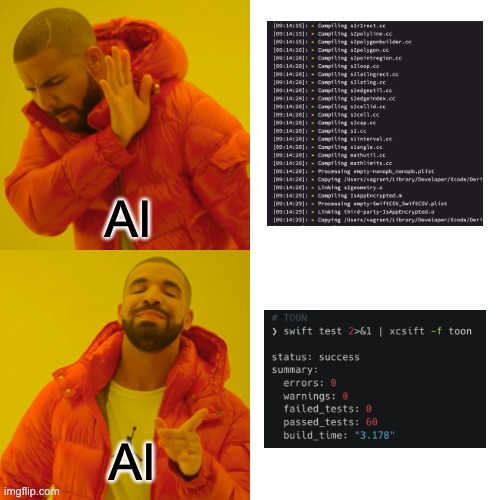
But even then, the biggest offender usually isn’t the MCP – it’s xcodebuild itself. Build output is extremely verbose, which is great for humans debugging locally, but mostly useless for an LLM. In practice, the agent only needs to know what happened (success or failure) and why (for example, which test failed). Everything else – code signing, linker chatter, derived data paths – is noise.
The fix is straightforward: put a filter between the build output and the AI. Instead of dumping the full log into the model’s context, pipe it through a small script that collapses everything down to a few lines summarizing the result, warnings, and errors. That’s more than enough for the agent to reason about next steps.
You can write such a script yourself (or ask the AI to do it), but the exact implementation doesn’t matter. What matters is the principle: never feed raw build logs to an LLM if you can help it.
Naturally, you might ask: how does the AI know it should use the filtered output instead of calling xcodebuild directly? You could document that in the rules file – but there’s a cleaner solution – Make.
By wrapping build and test commands behind a Makefile, you create a single, well-defined entry point for building, testing, and localizing the app. Instead of invoking xcodebuild directly, both the developers and AI agents use make build, make test, and so on. Behind the scenes, those targets can handle output filtering, environment setup, and any other glue you need – without the agent ever needing to know.
As a bonus, this setup usually simplifies CI as well, since the same Make targets can be reused there.
All that’s left is to reference these commands in your AI rules file so agents know which entry points to use:
## Common Build Commands

**Use Makefile commands for all build operations:**

```bash
# Building
make build             # Build Development scheme for simulator
make build-staging     # Build Staging scheme
make build-prod        # Build Production scheme

# Testing
make test              # Run all tests
make test-common       # Run Common module tests
make test-commonui     # Run CommonUI module tests
One final trick to keep context under control: use Subagents. Most modern AI coding tools support spawning isolated subagents with their own, minimal context. Each subagent gets the rules file and only the data required for a specific task – not the entire conversation history, build logs, or unrelated tooling output.
This makes subagents ideal for focused work like running tests, fixing a failing build, or performing a targeted refactor. When they’re done, they return a short summary to the main agent. The result: less context bloat, longer productive sessions, and fewer Why did it forget everything? moments.
Everybody wins!
Summary
This post has personal significance to me. It marks a milestone in my journey as a software developer – a point where setting development standards became not just automated and proactive, but genuinely convenient.
For a long time, enforcing these standards meant maintaining passive documentation nobody read and relying on reactive linters that complained after the code was already written. Rules files change that dynamic. They’re proactive. By maintaining them, teams can guide LLMs to generate compliant code by default. The best part? It aligns perfectly with the path of least resistance. You would actually have to explicitly instruct AI to produce non-compliant code.
There are trade-offs, of course. Creating effective rules files takes time and deliberate collaboration. But it’s also the most democratic way I’ve seen to establish development standards. Anyone on the team – even non-technical members – can propose improvements via a pull request, without needing to be a documentation expert.
The key is focusing on the fundamentals: project structure and architecture, dependency management, domain-specific logic (including edge cases), code style with concrete examples, and testing standards. That’s a lot to cover, which might make context size feel like a concern. In practice, it rarely is. Modern LLMs can handle detailed rules files just fine. The real challenge isn’t the size of the context window – it’s how well you manage it: which tools you load, what output you expose, and how much noise you let through.
As Abraham Lincoln put it: Give me six hours to chop down a tree and I will spend the first four sharpening the axe. For the first time in my career, the effort spent sharpening development standards finally translates into chopping code faster – and with far fewer compromises along the way.
Don’t miss any new blogposts!
By subscribing, you agree with our privacy policy and our terms and conditions.
Disclaimer: All memes used in the post were made for fun and educational purposes only
They were not meant to offend anyone
All copyrights belong to their respective owners
The thumbnail was generated with text2image
Some images were generated using Leonardo AI
Audio version generated with TTS Maker


