

Imagine you’ve just built an amazing iOS app for a restaurant. The client loves it, the users love it, their dogs love it, etc. As expected, soon enough you get a call from the client: Hey, can you make the same app for my other restaurant? Sounds simple. Just copy-paste the existing code, slap a new coat of paint (branding) on top of it, and send an invoice. Easiest money you’ve ever made, right?
Then another restaurant comes along, and another… Six months later, you’re managing 50+ similar apps, each with slight variations in branding, features, and content. Your Xcode invokes the Geneva Convention whenever you try to compile the project, your CI/CD pipeline is in tears, and you’re deeply questioning your life choices.

Wouldn’t it be better to somehow manage all these apps from a single codebase? Being able to pick and choose not only icons and colors, but also entire features? And to do all that without affecting other clients’ apps? Or causing other regressions?
Welcome to the world of white-label (WL) iOS development!
In this blog post, we’ll explore ways to build and maintain WL iOS applications that can change branding and features like a chameleon. We’ll examine various types of white-labelling approaches – from simple branding changes to fully modular solutions. For each approach, we’ll cover business reasoning, technical limitations, and common challenges. Finally, we’ll walk through proven strategies that will enable us to build and maintain such apps to work at scale.
Ready? Let’s dive in!
What is a White Label App…
If you round up 50 people and ask them that question, you’ll likely end up with 50 different definitions. The best analogy I ever heard is that of an empty retail space in a shopping mall. Such units share common elements: a display area, back room, storage, counter, cash register, etc. But it’s the business renting them that decides what will be sold there, how they would be organized and designed.
If a company running a pet store decides to pivot to a barber shop, nothing (except time and money) prevents such a rebranding from happening. The unit would remain the same, as would its physical location and properties. The only changes would be the services offered (type of business) and the decor (branding). This is exactly what white-label means in the digital realm.
Let’s imagine you’ve built a food ordering app. Just like the empty store unit, with a proverbial fresh coat of digital paint, it can get people their favorite meals from multiple places: a newly opened fancy Italian restaurant or an American burger joint. These would be separate apps, hosted independently in the App Store, sharing a common set of critical features: a menu, an order summary, a payment module, etc. Everything else – the content, the branding, even additional, bespoke features – would customizable.
In other words, a white-label iOS app is a reusable application template that can be customized and rebranded for multiple clients / brands without duplicating the entire codebase. Let’s see what it would take to create one.
… and why everyone wants to have one these days.
Knowing what a white-label app is, you might be scratching your head thinking why businesses would go into troubles to build them. After all, is maintaining multiple, independent apps that bad? In the age of vibe coding and favourable software development market, it should not be that hard to support such a fleet of apps. Especially if you can charge your clients / users for the work.
Naturally, it’s a rhetorical question. If you have your own product that can be white-labelled, investing into developing such an app will reward you in the long run:
- More resumable development costs:
Unless you’re a software house able to charge clients by the mythical time and material model, you should think twice before deciding to develop independent apps. Why? Because it’s expensive – really expensive. If you need to introduce a new feature into 10 apps, you’re looking at roughly 10x the development cost. That includes not only writing the feature, but also testing and deploying it. But wait – can’t I just implement the feature once and copy-paste it to the other apps? With AI’s help, it should be easy, right? In some cases, sure. Especially if the app is in early stages of development or the feature is really small. But as the apps mature and diverge from one another, the difficulty of introducing new features rises exponentially. Not to mention the edge cases and subtle bugs that start popping up. Investigating these can easily eat up all the time you’ve saved on copy-pasting the feature code. - Faster time to market:
Time is money. Even more so in competitive markets like food delivery. Remember when the World’s Most Famous Virus struck in 2019? For many restaurants, transitioning into the online food delivery quickly was a matter of life and death. What do you think is faster: developing a separate app (even by copying most of the existing code) or introducing new branding to a white-label app? The answer is obvious. Even setting aside dramatic disruptions, adapting to smaller changes, like switching to a new Xcode version for App Store submission or meeting, happens much faster with a WL approach. - Sustainable revenue model:
You can monetize white-label app development in several ways. The most common is a subscription model, where each client pays fixed or revenue-based fees. You can also introduce tiers – offering better support, priority access to new features, dedicated QA, and developers at higher levels. Most companies also charge for initial deployment, branding, and preparing materials for the App Store. (And yes, for each subsequent change too) Things get really interesting when a client requests a new feature. If the feature could be reused in other clients’ apps, you can incorporate it into your development roadmap and offer the initial client a discount for their patience. If it’s only useful for that particular client, you can still charge them for time, materials, and priority implementation.
As you can see, a well-thought-out and implemented white-label app equals a sustainable business.

Stages of white-labelling - from Simple Branding to Full Customization.
Not all white-label applications are created equal. In fact, there are significant differences between WL applications in terms of functionality and capabilities.
White-labeling can be applied to apps in distinct stages. The vast majority of WL apps I’ve worked on never got past the initial stage. And for good reason! Most clients simply don’t need additional features or customized views beyond simple branding.
But what if a client has special needs (and is willing to pay to have them met)? What if you have multiple such clients? How can you reconcile their requirements without blowing up your development budget? It wouldn’t hurt to familiarize yourself with the stages of white-labeling. Especially the thin line separating them:
- Stage 1: Basic branding (a.k.a. cosmetic surgery):
This is likely the entry point into making your app white-label. Unless the app you are working on was intentionally designed to be white label, you’ll likely have to begin with that stage. The best analogy is a food truck. You can only order from the menu, and there’s little room for customization. You can select a sauce for your burger or ask to hold the onions, but the burger will always be prepared the same way. And it will always be a burger.
Stage 1 is all about customizing app style and content.
You should aim to be able to adjust everything that can visually represent your client: logos, fonts, sizes, backgrounds, color schemes, etc. The thin line separating stages 1 and 2 is being able to change element position on the view. Normally, you do not want to allow this in Stage 1, because it adds another layer of complexity to the app. For example, a Sign In button can have a custom font, background color, and even tap animation – but it would always be pinned to the bottom of the Welcome screen. - Stage 2: Customized UI and UX (a.k.a. you can have your own views):
As expected, being able to merely change colors and fonts won’t be enough for some clients. Fortunately, most of them will be content with having customized views. That is where Stage 2 begins. A nice analogy is a local restaurant. In contrary to the food truck, you have much more customization options. You can order your steak extra-rare or well-done. You can ask the chef to avoid adding certain ingredients as you are allergic to them. Finally, you can ask for a mixture of two or more dishes, e.g. steak with pasta. Hey, don’t judge, some people have specific tastes!
Simply put: Stage 2 is all about allowing clients to have their own views.
Again, there’s a thin line separating Stages 2 and 3. In this case, modifications cannot add new features to the view. Imagine a generic welcome screen displayed after onboarding is complete. A user can usually choose between logging in, creating an account, or running the app in demo mode. If the client wants to prevent users from accessing the app without logging in, they can request hiding the continue without account button. That’s fine, because we’d simply remove that button form the view. However, if the client requested adding a log in with Facebook button and the generic version of the app didn’t offer this authentication method yet, that wouldn’t be possible. For example, Stage 2 modifications often involve creating custom onboarding flows, authentication screens, and customized content (e.g., loaded from client-specific feeds). - Stage 3: Fully white-label app: (a.k.a. a stack of black boxes):
Reaching this state is a problem you’d like to have. It means your business is booming and clients are seriously considering introducing distinct features. And paying handsomely for them.
After Stage 2, you should be able to deploy the app with a fully customized UI. Now, it’s just about scaling it up to the feature level. Stage 3 is considered the genuine WL app.
The best analogy I can come up with is a fancy restaurant. Once there, you’re presented with a menu. You can order a steak as is, ask for it extra-rare, or request the chef prepare something special – just for you. Naturally, you’ll likely wait a bit longer for your order. The restaurant might not have all the necessary ingredients. Sometimes they might outright deny your request. Don’t believe me? Try ordering grilled pasta in an Italian restaurant… Returning to the boring reality of software development, all the custom dishes features requested by clients are usually put into the backlog. The ones that exhibit potential (e.g., can be integrated into the core version of the app) are typically implemented first – unless the client is willing to pay extra for expedited delivery.
To put it simply, Stage 3 == power.

Finally, let me address the elephant in the room: sales teams often can’t tell if a given feature request from a client crosses the boundary between stages of white-label app development. For example, a seemingly innocuous request to make the logo float like an action button, on top of the main app view, might be considered simple. But according to our categorization, it requires creating a custom view, which is a Stage 2 request. If the app is still in Stage 1 and the promise to the client was already made…
To prevent this from happening, make sure all client requests go through a simple classification process. Ideally by a developer or a QA. If you need to deny some of these requests, it’s worth presenting an alternative. For example, a logo won’t float on top of the main screen, but it can have a nice 3D effect or shadow. Maybe that’ll be enough for the client?
Shared Technical Challenges
Classification aside, there are also a couple of common challenges all white-label apps share. As always, the severity of these issues varies from project to project and greatly depends on the number of clients using the app. I think it’s worth mentioning the most frequently occurring challenges here so you can prepare for them in the early stages of app development – when the number of clients is still manageable:
- App Store spam rejection, reviews, metadata, etc.:
As you might know, Apple doesn’t want the App Store flooded with essentially identical apps that only differ in branding. There are even specific guidelines (2.6 and 4.3) that essentially say: Don’t submit multiple apps that are too similar, also known as the spam rejection. Unfortunately, that is a serious concern. Apple is known to reject apps for being too similar or not offering unique business value, even when they are operated by genuinely different companies.
So, how can you prevent the rejection? First of all, make sure all clients have their own App Store accounts! This is non-negotiable, but unfortunately, it’s often not enough to be safe.
Next, make the apps vary from each other – not just in branding or UI modifications, but in content too. Connecting two food ordering apps to the same news feeds just to fill up the Home screen might not be the best idea… Naturally, each app needs its own App Store metadata: screenshots, keywords, descriptions, etc. It’d be best if you could automate the process of generating this data. What worked for me was a simple spreadsheet that I asked clients to fill in. Then I extracted the data with a simple script and uploaded it to App Store Connect via the API. In the age of AI, it would also be worth comparing metadata provided by different clients to determine if they vary enough.
Finally, it wouldn’t hurt your case if the apps have different functionalities. If a given app distinguishes itself from the pack, make sure it’s highlighted in the App Store metadata and review guides. - Managing Code Signing and Provisioning Profiles:
Managing provisioning profiles and certificates can be a challenge in one app. Now multiply it by 10, or 50… Naturally, since every client requires their own App Store account, they’ll have to provide at least a release certificate and provisioning profiles, ideally coupled with a p8 for push notifications. Explaining how to generate these can be a challenge, especially if the client is non-technical. Be prepared to repeat this effort every time a certificate is about to expire…
Of course, you can ask to be given access to App Store Connect / Apple Developer Portal and do it yourself, but is it sustainable in the long run? Especially if the app runs on multiple environments: Staging, Pre-Production, etc.
What I’d suggest is automating the process of managing certificates and profiles through the App Store Connect API. All a client would have to do is generate you an API key. This key can then be used to register a new testing device and add it to a provisioning profile, regenerate and download that profile, or even release an app. All through the API. And what about automation scripts? Honestly, unless you strongly dislike Ruby, I’d simply use Fastlane and tasks like match. With readily available agentic AI tools, configuring robust, white-label Fastlane configuration should not be a challenge! - Asset Management:
Next, let’s discuss managing app assets. As you can imagine, different client apps will require separate sets of assets to build.
The assets will likely be divided into two groups: core and client-specific.
The core assets power the app’s shared features, like onboarding or authentication. Each asset must be uniquely named so it can be referenced and retrieved by a given feature. I’d personally use a set of enumerations, e.g.,Images,Fonts, orAnimations. Within these enumerations, I usually define sub-enumerations representing each core feature:Images.Onboarding. Naturally, you don’t have to create all that boilerplate manually – use automated generators like Swiftgen instead.
The client-specific assets must be included when the client app features unique functionality or views. Although naming and referencing such assets doesn’t have to follow strict guidelines described above, I’d recommend using the same methods for consistency.
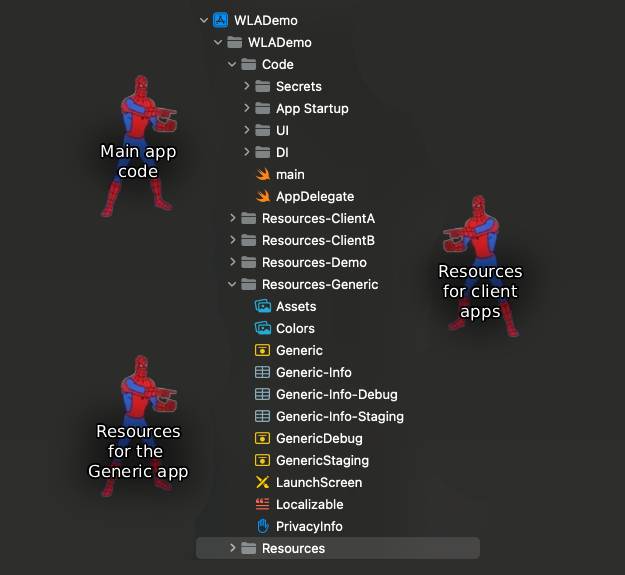
Once this is done, the only remaining question is: How can we ensure we build the client’s app with the correct set of assets? The easiest way to do that is to run a simple script that copies client assets to theResourcesfolder before building the application. More advanced methods include creating dedicatedTargetsfor client apps, each containing its own set of resources.
- App Configuration
A white-label app configuration should balance consistency and flexibility.
It must provide setup data to all core features while ensuring client-specific features receive their configuration as well. I’d propose dividing the app configuration into three distinct layers, each serving a specific purpose:
The first layer is the app-level configuration, which defines global settings shared across all client apps. This includesbaseURL,firebaseKey, and other infrastructure-level parameters.
The second layer handles configuration for the core app features. The vast majority of data here are feature flags, allowing you to remotely enable or disable a given feature, e.g.,onboardingEnabled. The rest of the data pertain to the behavior of these features.
The third layer manages client-specific features, enabling unique functionality for individual clients. Finally, no matter how well you implement your features, you might need to reconfigure them when the app is already deployed. In the worst case scenario – you might even need to disable them. That’s why we haveRemote Configuration. It acts as a dynamic override layer, giving you unprecedented flexibility in managing your white-label apps at scale.
If the remote configuration can’t be retrieved, the app should fall back to the last synchronized version. If that’s unavailable, it should use the configuration it shipped with.
{
  "appConfiguration": {
    "baseURL": "<https://api.mywhitelabelapp.com>",
    "firebaseKey": "AIzaSyC1234567890abcdefghijklmnop",
    "apiVersion": "2.0.1",
    ...
  },

  "coreFeatures": {
    "onboarding": {
      "enabled": true,
      "skipAfterFirstLaunch": true,
      ...
    },
    "authentication": {
      "enabled": true,
      "allowSocialLogin": true,
      ...
    },
    ...
  },

  "clientConfiguration": {
    "loyaltyProgram": {
      "enabled": true,
      ...
    },
    ...
  }
}
White-label apps face common technical challenges that scale with the number of clients. Address them early, when mistakes are easily reversible and inexpensive to fix. The most critical challenge is avoiding App Store spam rejection. Ensure each app deploys from a separate App Store account and has unique metadata, content, and functionality. Next, invest in robust automation – from asset processing to provisioning profile generation. Finally, implement remote configuration with a fallback to the version the app shipped with. The ability to reconfigure the app without pulling it from the store is non-negotiable for WL apps!
Implementation Strategy #1: One App, Multiple Targets (a.k.a. Here comes the pain…)
Arguably, the most obvious option to implement a white-label app would be to create multiple Xcode targets – one for each client’s app. After all, we have solutions like Swiftgen or Tuist to create an project file for us, based on the clean yaml configuration, right? We could extract the shared portion of the code to a dedicated folder, and all the client-specific one to different ones. Sounds easy, right?
To put it gently, this approach is suitable only for masochists. Finding all the relevant folders in Xcode would be a nightmare. Let alone managing them. Imagine navigating around 30 folders containing custom client Onboarding code. Thinking about updating your LinkedIn profile already? I can’t blame you.
Next, let’s consider maintaining constant app release readiness. To be absolutely sure you can release every client’s app at any given moment, you must ensure your development branch contains code that compiles into all these apps – preferably without regressions or other issues. To achieve that, you must ensure that only such code passes the code review. And to do that, you should build every client app before green-lighting a PR. I’m sure you’ve connected the dots by now: dozens of CI build jobs triggered every time you need to, say, update the localization file for one of the clients. That’s a very long wait to merge your PR. And a costly one at that – even if you run an in-house build server!
Let’s move on to dependencies. Imagine your app relies on a networking layer wrapper like Alamofire. Everything works fine… until a client asks you to implement a custom feature: a community chat module. It seems easy to implement because the chat functionality comes from a third-party library. And that library also relies on Alamofire. And the two versions are incompatible. Welcome to Dependency Hell! If you think this scenario sounds far-fetched, this is what Android devs dealt with daily. Just Google the dreaded: Dependency Error. See console for details.
Finally, let’s consider the human factor. How likely is it that every time you need to make changes affecting multiple client apps, you won’t make any mistakes? Forgetting to include a newly added folder in the project.yaml file, copying resources to the wrong folder, etc. – these are just a few errors you can make when dealing with multiple app targets. To make matters worse, the app could compile just fine locally. Swift’s compiler caching mechanism is a mysterious and terrifying beast. Sure, you can clean the build every time you switch between client targets, but would that be enough? Maybe a clean wipe of the Derived Data folder would be better? Hope you like working overtime…
TL;DR: If you need to start transitioning your app into a white-label solution, please DO NOT consider the multi-target approach.
Implementation Strategy #2: One App, One Target, Copyable Assets (or Maybe Code Too?)
As an alternative to the multi-target approach, this is the simplest yet surprisingly powerful method to turn the app into a white-label solution. The only modification to the standard app build process it introduces is copying client-specific assets to the Resources folder. To keep things simple, we assume that the content of the client’s Resources folder is a complete package, containing all the localisation files, configuration (e.g. info.plist), icons, fonts, images, etc.
In theory, this method is feasible only for Stage 1 WL apps. After all, unlike Android, we don’t have the luxury of defining app Flavours that can contain app assets and code. What we do have, however, are tools like swiftgen. We can use them to generate xcodeproject file and include client-specific code that comes packaged with assets. This opens up really interesting possibilities. Before we get carried away, however, let’s look at the downsides of this approach.
First, it’s almost impossible to provide comprehensive test coverage for code introduced this way. To ensure that, you’d have to build the app in all potential variants and execute its tests. Even on a powerful CI, we’re looking at an insane waste of resources and a very long wait time to verify if a given PR is safe to merge.
Furthermore, the quality of life working with such a project leaves a lot to be desired. Having to copy the resources each time you want to test the app in a particular branding isn’t an issue. Updating assets or localization files can probably be automated somehow. Unfortunately, when we add client-specific code into the mix, we’re entering a world of hurt. Imagine all the lovely issues resulting from Xcode caching some client-specific code between building different versions of the app… Imagine spending hours trying to figure out why a build is failing on the CI and not locally…

So, as tempting as this method might initially sound, it’s not a silver bullet for your white-label transformation. However, it’s definitely worth considering as an entry point for starting that transformation – especially if you’re pressed for time and the only differences between client apps are branding, configuration, content, and localization..
Implementation strategy #3: Modular app
Now we’re talking! I hope it comes as no surprise – modularization is my preferred approach to implementing white-label apps. Some developers say this is the only true WL app. In my opinion, it depends on the WL definition we agree on. What’s beyond doubt, however, is that the modular approach offers the greatest flexibility, customizability, and separation of client-specific code from core modules… At the cost of increased configuration overhead and a steep learning curve for developers. There’s no such thing as a free lunch.
Why is it worth switching to modular app architecture? Putting simply, if your app is a monolith, it’s extremely difficult to ensure that specific features developed for client A won’t bleed into the applications of clients B, C, etc. Furthermore, it allows you to effectively divide work between larger (20+) development teams with minimal risk of conflicts. If needed, you can even delegate some work to external contributors (e.g. freelancers or software houses) without giving them access to the critical parts of the codebase.
Modular architecture is incredibly flexible because you can freely swap modules – as long as the new module matches the API and functionality of the current one. Ideally, it shouldn’t introduce any side effects either. If these requirements are met, you can replace a generic onboarding module with a client-specific one, and the rest of the application won’t even notice the change. I dove deeply into this topic in my blog post about Liskov’s Substitution Principle.
Perhaps the most valuable long-term advantage is component reusability. It’s often worth listening to your clients and prioritizing features they request. Such features can, in time, become another core component in your app, widening your offer to new and existing clients. And what about the original client that ordered the feature? Wouldn’t they be a wounded party in this deal? No – if you offer them a chance to participate in the costs. It’s a win-win situation: the organization that ordered the feature received it cheaper (and often faster), and you’re free to monetize it for your other clients. In time, the arsenal of core features your app offers will grow to the point that each new client won’t have to order bespoke features anymore. These would already be available. Time to market dramatically goes down, while you’re free to devote your time to more important parts of the backlog.

Interested? Let’s discuss how to actually implement a modular, white-label app. First, take a look at the following diagram:
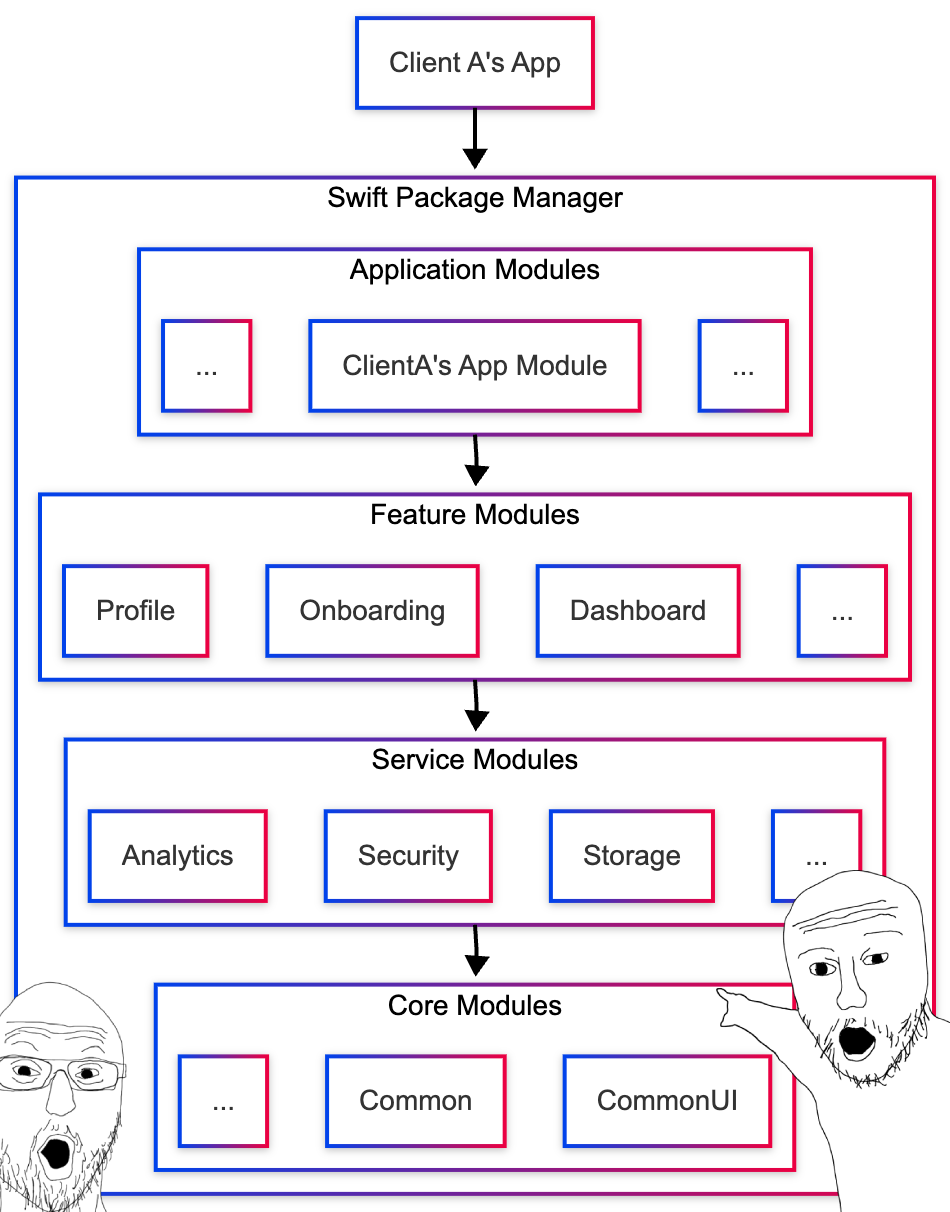
The diagram might look intimidating, but I assure you – it’s simpler than it appears. As we all know, modules can have different responsibilities and hierarchies. We covered this in detail in the blog post about modularity, so I won’t dive too deep here.
From a white-label perspective, Feature Modules are what matter most. Think of each app feature as a mythical black box: you initialize it, inject its dependencies (like a network controller or style provider), and connect it to the app. Your box does all the heavy lifting – it creates the UI, handles user feedback, and notifies the rest of the app when it’s finished, encounters an error, or needs additional data. Once the box completes its job, you can remove it from display or suspend it. Again, the Onboarding is the perfect example. You initialize it, put it on display, and wait until it’s finished presenting before navigating away to another app feature. What about permanent features, like the Home Screen? Such features usually live on separate tabs/windows and are periodically brought to focus when the user switches into that tab or window.
The only modules that top the Feature Module in the module hierarchy are Application Modules. You can think of them as carrier bags where you put all the modules needed to build an app for a given client. Application Modules rarely contain any code or resources themselves – they simply aggregate app building blocks under a common umbrella:
@_exported import Common
@_exported import CommonUI
@_exported import OnboardingClientA
...
What do we do with such a module? We link it to an Xcode Target representing a client’s app and use it as a gateway to access the underlying code. This approach has many advantages. First, we wouldn’t have to import all the submodules in every *.swift file belonging to the client’s app target – simple import AppModuleClientA would do the trick. Second, and this is very important, there’s little risk of importing the wrong modules (e.g., ones belonging to another client’s app). Just like a carrier bag, the Application Module carries over all the code we need to the client’s app. Clean and neat!

Modular app challenges: How (and where) should app features be built?
It’s an age-old question: how much detail should a module expose to the outside world? My personal preference is that each feature module exposes only a Factory that produces a Coordinator housing it. This Coordinator provides a simple, standardized API to control the flow: start, stop, etc. Naturally, the flow needs configuration, dependencies, a UINavigationController to lay itself onto, etc. Normally, setting these up would require the client’s app to know many implementation details about each feature module. These details aren’t essential for the main app and tightly couple it with a particular set of modules, increasing maintenance costs. That’s why exposing a Factory that creates a ready-to-use feature flow might be a good idea, as it encapsulates all the implementation details within the module. If you ever need to swap the module, the Factories these modules would use will likely be almost identical.
public enum OnboardingFeatureFactory {
    @MainActor public static func makeOnboardingFeature(
	  navigator: Navigator,
        configuration: FlowCoordinator.Configuration,
        dependencyProvider: DependencyProvider,
        ...
    ) -> FlowCoordinator {
	  ...
	  // Construct OnboardingFlowCoordinator dependencies
	  ...
        return OnboardingFlowCoordinator( ... )
    }
}
If we encapsulate an entire feature in a module, it likely won’t be self-sustainable. It will need to make network calls, access local storage, or initiate navigation requests. The code implementing these utilities would likely reside in Common or CommonUI modules. But does our Feature Module need to know any of that? Does it e.g. care if we inject an authentication token as a header field or as a cookie? Of course not. This is why we hide the implementation details behind abstractions, exposing only the API that can be accessed within a module. Such APIs are often defined by protocols, e.g., NetworkController or LocalStorage. So, all we need to do to make our Feature Module fully functional, is to provide it with a reference to whatever Dependency Injection provider we’ve chosen. Flexible, testable and clean – just as the doctor ordered. I’ve described different approaches to Dependency Injection in modular apps in another blog post. Feel free to take a look and choose the method that fits your app best! The only question about Dependency Injection that remains unanswered: Which module should be responsible for initiating the dependencies we need? And the answer is… none. The client’s app should be doing it. It’s one of the app’s main responsibilities, besides composing configuration and handling assets:
struct DependenciesInitializer {
    ...

    func registerDependencies() {
        let networkModule = NetworkingFactory.makeNetworkModule(baseURL:...)
        let storage = UserDefaults.standard
        ...
        dependenciesRegistrator.register(storage, for: LocalStorage.self)
        dependenciesRegistrator.register(networkModule, for: NetworkModule.self)
        ...
    }
}
Modular app challenges: How to customize individual views and flows?
Remember how we’ve discussed what distinguishes Stage 2 from basic WL app? It’s the ability to freely customize the UI of the app without changing the functionality. But how can we do that when each Feature Module is responsible for creating its own UI? How can the module access client-specific assets it needs? Obviously, there’s only one place in the app that has all that resources – the client app itself. So, if we wanted to create a custom onboarding views for the onboarding, it would be reasonable to implement such views in the app and pass them over to the module, right? In theory, yes. But is it really efficient to create the views up-front, even if they might not be needed? E.g. when the user decides to skip the onboarding? No. Instead of creating individual views and passing them directly to the module, it’s better to introduce a well-known abstraction: the ViewFactory :
@MainActor public protocol ViewFactory {
    func makeView(
        forRoute route: any Route,
        withData data: Any?
    ) -> [ViewWrapper]
}
This factory accepts the name of a view and produces its implementation. Whenever a module needs to create a client-specific view in a generic Feature Module, it simply asks the custom factory. Neat! To further streamline this process, I’ve gotten into the habit of stacking view factories on top of each other (1). This way, in client-specific factory, I would only have to implement creation of the bespoken views. The rest would be handled by the built-in view factory of the module.
And what if a client requests custom ordering of views? Or showing non-standard views in response to navigation requests? We simply extend the idea, creating factories for navigation flows. Each Feature Module usually has a single Flow Coordinator handling internal navigation (showing a particular view in a specific way). What if we could implement that logic in the client app and inject it into the module, just like we did with View Factory? Enter FlowCoordinatorFactory :
@MainActor public protocol FlowCoordinatorFactory {
    func makeFlowCoordinator(
        forRoute route: any Route,
        navigator: Navigator,
        parentConfiguration: FlowCoordinator.Parent,
        withData data: Any?
    ) -> FlowCoordinator?
}
And we can stack Flow Coordinator Factories as well (2)! The complete setup light look like this:
public enum OnboardingFeatureFactory {

    @MainActor public static func makeOnboardingFeature(
        ...
        viewFactories: [ViewFactory] = [],
        coordinatorFactories: [FlowCoordinatorFactory] = []
    ) -> FlowCoordinator {
		    ...
        let defaultViewFactory = OnboardingViewFactory(...)
        let defaultCoordinatorFactory = OnboardingCoordinatorFactory(...)
        return OnboardingFlowCoordinator(
            ...
            viewFactories: defaultViewFactory.combine(withCustomFactories: viewFactories), // (1)
            coordinatorFactories: coordinatorFactories.combine(withCustomFactories: defaultCoordinatorFactory) // (2)
        )
    }
}
Modular app challenges: How to switch between features?
Another important question when dealing with modular apps is: How do we switch visually between features? Navigation within a module is rather straightforward. Thanks to FlowCoordinatorFactory and ViewFactory (built-in or injected), a module can confidently create and display all its internal screens. But what if it needs to display a screen that belongs to a different feature? We need to notify the right module to display the view. But what if the module isn’t visible at the moment?
There must be an overarching navigation object that handles switching between modules and tracks which module is currently displayed at the top app level. Enter RootFlowCoordinator, which resides in the client app. It only responds to navigation calls requesting showing a new app feature, e.g. Sign In after user has completed the Onboarding.
That sounds great, but how do we notify the big boss of navigation that it needs to switch things up? We have two choices: use FlowCoordinatorDelegate or NavigationRouter. With the former, we notify the current flow delegate that the flow has concluded, attaching a description of which view to show next. If the parent flow (usually being the delegate for its child) can display that view, it does so. If not, it also concludes while notifying its delegate. And so the chain continues until the correct coordinator is found. NavigationRouter follows a similar concept, but instead of relying on coordinator delegates, it decides which coordinator to show or switch to. It does so by traversing coordinator hierarchy it has constant access to, e.g. by holding them in an array.
The last critical component of cross-modular navigation is designing an abstraction describing the view we wish to show. Such NavigationRoute, usually a protocol, must provide at least a unique screen ID and presentation mode to guarantee proper display.
public protocol Route: Equatable, Sendable {
    var name: String { get }
    var isFlow: Bool { get }
    var popupPresentationStyle: PopupPresentationStyle { get }
    var transition: RouteTransition { get }
    ...
}
Take a look at the article about modern SwiftUI / UIKit navigation for more information.
Modular app challenges: How to apply client branding to features?
Another piece of the puzzle in modular white-label apps is application of client’s branding. Again, we face an eerily familiar challenge: since the views are isolated within modules, how can we provide them with all the styling they need to render themselves? Thanks to SwiftUI, the answer is simple: by using the Environment.
Since SwiftUI-exclusive navigation isn’t an option for most apps, I usually create a helper to expose my views to UIKit (1). The helper to reuses Environment injection logic for all major views in the app. You only need to inject the styling at the root view – the one passed UIHostingViewController. The injected object will automatically become available in all SwiftUI views attached to that root, regardless of their depth.
The Environment requires us to provide default values for injected objects at the time of CommonUI module compilation. Naturally, the StyleProvider won’t be available at that moment, as it’s scheduled to be created when the main app compilation. Fortunately, we can provide placeholder implementations for all objects initially. That’s enough to make CommonUI compile. Then, at app runtime, when the view is created, we replace the temporary values with the actual ones (2). To access the client-specific styling within one of the reusable Views or ViewModifiers locked in the CommonUI module, we simply retrieve it from the Environment (3). I wrote an entire blog post about dynamic styling, so check it out for implementation details and more challenging edge cases!
public extension View {
    func toViewController( // (1)
        styleProvider: StyleProvider = StyleProviderKey.defaultValue,
        localizableProvider: LocalizableProvider = LocalizableProviderKey.defaultValue,
        ...
    ) -> UIViewController {
        let rootView = environment(\\.styleProvider, styleProvider)
            .environment(\\.remoteAssetProvider, remoteAssetProvider)
            ...
        return UIHostingController(rootView: rootView)
    }
}

...

let view = MyView(viewModel: viewModel)
return view.toViewController( // (2)
    styleProvider: dependencyProvider.resolve(),
    remoteAssetProvider: dependencyProvider.resolve(),
    ...
)
...
@Environment(\\.styleProvider.getButtonStyle) private var buttonStyle // (3)
How to minimize regressions?
Imagine you create a PR that tweaks padding on one of the CTA buttons. It looks perfect for Restaurant A, the tests on CI pass, so you merge the change. It gets past QA and you ship the app to the store. A week later, you ship another app – this time for Restaurant B. The moment it hits the App Store, your Slack explodes. Your innocent change has broken that client’s branding, and they’re out for blood.
This is the white-label testability nightmare. When managing multiple client apps from a single codebase, you must ensure you’re not introducing breaking changes to any of them. This is especially true for reusable views – they’re used everywhere so any regressions multiply across all your clients.
Of course, you could implement thorough manual regression testing for the app before releasing it. Bear in mind however: that’s expensive and time-consuming. Especially if issues are found. You might also be tempted to explain to the client why there are regressions in their app. Trust me on this: don’t do that. Explaining to a client that their production app is broken because you were helping their competition is NOT the smartest course of action.

What you really need is the freedom to refactor, modify, and extend reusable components without worrying that you’ll break them when rendered with a specific client’s branding. So, how can we do it?
What works for me is creating a snapshot test matrix for every reusable view. For each such view, capture all its states (default, disabled, loading, error, etc.) and multiply by the number of client brandings you support. The result? A comprehensive matrix that catches any UI changes instantly. As for the library to handle snapshots creation and verification, I strongly recommend using swift-snapshot-testing:
@MainActor
struct PrimaryButtonSnapshotTests {

    @Test(
        "Button snapshot matrix",
        arguments: [
            (state: ButtonState.default, branding: "RestaurantA"),
            (state: ButtonState.disabled, branding: "RestaurantA"),
            ....
        ]
    )
    func testButtonSnapshots(state: ButtonState, branding: String) {
        let button = PrimaryButton(
            title: "Tap Me",
            isEnabled: state != .disabled,
            isLoading: state == .loading
        )
        .withBranding(branding)

        assertSnapshot(
            of: button,
            as: .image(precision: 0.98, perceptualPrecision: 0.99), //(1)
            named: "PrimaryButton_\\(state)_\\(branding)"
        )
    }
}
One important thing to mention with snapshot tests is adjusting their precision. You don’t want the tests to be pixel-perfect, as that would cause flakiness. Human eyes can’t detect such tiny differences anyway. You don’t want them to be too liberal either. In my experience, a precision of 0.98 and a perceptual precision of 0.99 is a reasonable compromise between avoiding false positives and catching actual breaking changes.
The downsides? First, you’ll need to regenerate snapshots each time a new iOS version is released. This is due to subtle changes in font sizes, UI element depth, and similar details. The same applies whenever a client’s branding changes. Additionally, most tests live in modules, but the resources needed to set up those tests reside in client apps. You need to make those resources available when compiling test targets. The simplest solution? A straightforward script to copy production resources into your test setup – similar to what we discussed when applying branding to Stage 1 white-label apps.
Finally, snapshot tests take approximately 10× longer to execute than standard unit tests. While still in the millisecond range, the time quickly adds up when your app grows. So don’t be surprised when your CI takes progressively longer to check each PR. If you have any other questions about snapshot testing, take a look at my post about creating maintainable and testable SwiftUI views.
What about non-UI components? Again, rely on thorough unit tests with multiple test cases using data that resembles production as closely as possible. Swift’s new Testing framework makes this simple with parameterized tests. In a nutshell: you can define parameters for a given test case, seeding it with different combinations of input values:
@Test(
    "Payment validation",
    arguments: [
        ("1000", Currency.USD, true),
        ("0", Currency.USD, false),
        ...
    ]
)
func testPaymentValidation(amount: String, currency: Currency, expectedValid: Bool) {
    let validator = PaymentValidator()
    #expect(validator.validate(amount: amount, currency: currency) == expectedValid)
}
And what about XCTest framework? Well, nothing stops you from extracting the test logic into a helper function with parameters. Then simply call this function in a test case, leveraging different combination of values. One thing worth remembering is to ensure that, if a test fails, error will point out to the call site, rather than the helper function itself. You can do it by passing call site file and line to the helper function, and then to actual assertion(s):
private func assertPaymentValidation(
    amount: String,
    currency: Currency,
    expectedValid: Bool,
    file: StaticString = #file,
    line: UInt = #line
) {
    let result = validator.validate(amount: amount, currency: currency)
    XCTAssertEqual(
        result,
        expectedValid,
        "Failed for amount: \\(amount), currency: \\(currency)",
        file: file,
        line: line
    )
}
While thorough unit and snapshot test coverage should protect you from introducing common regressions, it might not be enough for a white-label app. You must also verify that every client app builds successfully. Test suites might pass, but if Restaurant B’s app won’t compile, you’ve introduced a regression. Therefore, build the release version of each client app regularly – ideally with every PR.
The downside? Building all these client apps takes forever, even without code signing. The solution? Parallelization. Every modern CI/CD system lets you mark specific jobs as executable in parallel. Building a release version of a single client’s app is a perfect use case. The parent process waits for all its children to finish, aggregates the results, and reports them to Github. If you can’t (or don’t want to) use this feature, simply configure each client’s app to start building when a new PR is created. You’ll have lots of additional checks on your PR, but the end result is the same.
Of course, you should be mindful of your CI/CD bill. Most providers charge by the minute the instance is running. If you’re handling multiple client apps, it’s worth switching to an all you can eat build type of billing. If that’s impossible, try negotiating more build credits or minutes included in your monthly plan. If you’ve spent this allowance, consider switching to building only randomly selected client apps. Or maybe building them once a day as smoke tests. Whatever works best for you.
However, the ultimate method of reducing build time and cost is switching to an artifact-based build system like Bazel. To put it simply: each part of the process takes well-defined, versioned inputs and dependencies (e.g., a CommonUI module depending on a Common module) and produces equally well-defined, versioned deliverables. If the input hasn’t changed since the last time we built a given module, there’s no need to rebuild it. If, in my PR, I introduce changes to the Payment Module, I only need to rebuild that module plus any other modules or client apps that rely on it. That instantly saves a lot of time (and money).
With all these safeguards in place, the CI acts like a nightclub bouncer. You won’t get in unless you’ve paid, you’re sober, and you’re dressed appropriately. Similarly, the CI won’t let you merge your changes unless every test passes and every client app builds successfully. Is it a pain? Yes. Is it necessary? Also yes.

What are the consequences if you don’t thoroughly test your core components? The fate of the team behind the Titan submarine that imploded in June 2023 could serve as an example. The team also felt like third-party certification processes (especially of the hull) were slow and unnecessary…
Summary
We’re done! Thanks for sticking out to the end!
The key takeaway from this post is that building a white-label app isn’t a binary choice between a basic branded clone, or spending years rewriting everything from scratch. Virtually no application starts as a white-label solution – most become oned as business requirements demand it. That’s why understanding the three stages of white-labeling is crucial. We’ve explored how Stage 1 apps handle basic branding through build configurations. We’ve discussed how Stage 2 apps introduce dynamic styling and remote configuration for runtime flexibility, and how Stage 3, the true white-label app, relies on full modularization for maximum scalability and component reusability.
|
Dimension |
Stage 1: Basic Branding |
Stage 2: Customized UI/UX |
Stage 3: Fully Modular |
|
Effort Level |
Low |
Medium |
High |
|
Development Cost |
Low |
Medium |
High |
|
Time to Market |
1 – 2 weeks |
1+ month |
Impossible to tell |
|
Customization Scope |
Branding and content |
Custom views and their ordering within navigation flows |
Complete feature customization, bespoke features |
|
Use Case |
Similar apps with minor branding differences |
Clients need distinct layouts but not bespoke features |
Clients require bespoke features and / or complete customization |
The key insight? Only push for transitioning to the next stage when clients really need it. Before that happens, however, keep your business stakeholders informed about what’s technically possible at each stage. Overpromising capabilities that your current architecture can’t deliver is a recipe for disaster.
We’ve also briefly touched on typical technical challenges associated with developing and maintaining white-label apps: managing dynamic styling, handling remote assets, and implementing robust dependency injection, to name just a few. With all the ongoing development, it’s also critical not to lose sight of clients. Each of them runs a business and employs people. A big part of their livelihood depends on us delivering not only client-requested features, but also issue-free and regression-free apps. To ensure that, we must maintain comprehensive snapshot and unit testing suites, verifying reusable components across all brandings, configurations, and states. We should also make sure we can build and deploy each client app at short notice.
Ultimately, a white-label app is just another app with an added layer of complexity. Instead of merely ensuring the app looks good, we must make sure it looks good in each client’s branding. Building and maintaining one will likely expose us to challenges we’d never encounter with non-white-label apps. It’s also oddly satisfying. Coming up with ideas to overcome seemingly insurmountable challenges in dozens of apps simultaneously – nice!
Don’t miss any new blogposts!
By subscribing, you agree with our privacy policy and our terms and conditions.
Disclaimer: All memes used in the post were made for fun and educational purposes only
They were not meant to offend anyone
All copyrights belong to their respective owners
The thumbnail was generated with text2image
Some images were generated using Leonardo AI
Audio version generated with TTS Maker


